---
title: Accessing Courses From Your AOEU Account
description: Steps on how to access your Course, including some helpful tips.
---
[Skip to content](https://help.theartofeducation.edu/accessing-courses-from-your-aoeu-account#main-content)
English
Show submenu for translations

Open main navigation
Close main navigation
- English
Show submenu for translations
- [Go to The Art of Education](https://theartofeducation.edu/)
[Go to The Art of Education](https://theartofeducation.edu/)
How can we help you?
- There are no suggestions because the search field is empty.
1. [Help Center](https://help.theartofeducation.edu/?hsLang=en)
2. [Academics - Current Students](https://help.theartofeducation.edu/academics-current-students?hsLang=en)
3. [Student Portal](https://help.theartofeducation.edu/academics-current-students?hsLang=en#student-portal)
# Accessing Courses From Your AOEU Account
## Steps on how to access your Course, including some helpful tips.
**New students**
You will be able to access Brightspace, our LMS, 5 days before your first course begins. At that time, you will see a gray course tile on your home page. *Do not be concerned if you are unable to access Brightpace prior to this 5-day mark. This is expected!*
**Returning students**
You will not see future courses until 5 days before the course start date. At that time, you will see a gray course tile on your home page.
**All Students**
2 days before the course start date, your tile will become colorful and you can access all course content.
**View our upcoming course schedule [here](https://theartofeducation.edu/courses/schedule/)!**
---
**Please follow the steps below to access your course:**
1\. Log into your AOEU account.
*\*To ensure you are able to access your coursework smoothly, be sure your [AOEU student email address is activated](https://help.theartofeducation.edu/how-do-i-activate-my-aoeu-.edu-gmail?hsLang=en) and [logged into your browser](https://help.theartofeducation.edu/how-to-add-another-account-to-your-google-browser?hsLang=en). Choose the "Continue with Google" option and your AOEU student email address when prompted.*
2\. Select **My Courses** on the Master’s Degree or Graduate Courses card on the My AOEU homepage.
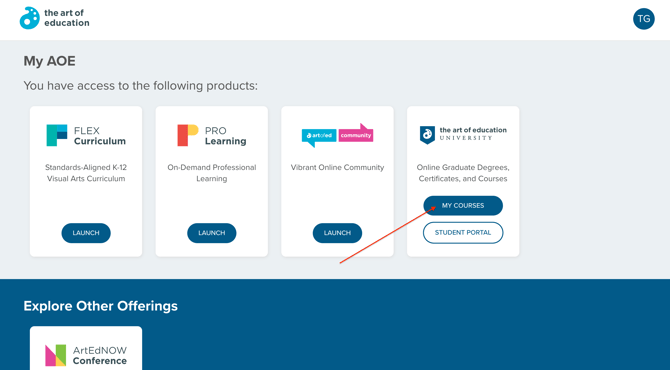
**Alternate Option:** Master’s Degree and Graduate students will select **My Courses** located on the card at the top of the My AOEU homepage.
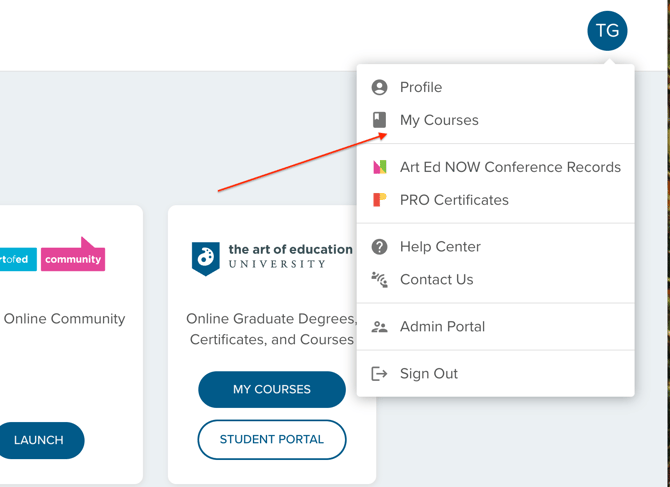
*Tip: if you are unable to open your Courses, you may have a pop-up blocker enabled. Check your settings or use a different device to see if that allows your courses to open.*
If you have questions regarding your course, please contact your professor.
#### **Troubleshooting Access Issues**
- **403 Error: app\_not\_configured\_for\_user **
- Activate your AOEU student email address. Read how to do this [here](https://help.theartofeducation.edu/how-do-i-activate-my-aoeu-.edu-gmail?hsLang=en).
- Add your email address to your browser profile. Find steps on how to do this [here](https://help.theartofeducation.edu/how-to-add-another-account-to-your-google-browser?hsLang=en).
- **Clear your cache**
- Follow the steps found [here](https://us.norton.com/blog/how-to/how-to-clear-cookies).
- **Network blockers**
- District computers can have [firewalls blocking access](https://help.theartofeducation.edu/preventing-firewall-blockers?hsLang=en). Try on a personal device or network to see if that resolves your Student Portal access.
- **Browser issues**
- Try an incognito or private window.
- Try a different browser - Chrome, Safari, Firefox, Edge.
#### Course Access
Save all course assignments, discussion board posts, and resources of interest to your local hard drive or to cloud storage.
- Degree-seeking students will retain access for 1 year after graduation.
- Continuing education students will retain access for 30 days after the trimester ends.
If you register for coursework in the future, your Brightspace access will be reinstated on the course start date. At that time, you will have access to current and past courses.
For more information, see 8.07 Records Retention in the [catalog](https://theartofeducation.edu/courses/academic-catalog-archive/).
---
**Additional Help**
If you have any other questions, please email us at [help@theartofeducation.edu](mailto:help@theartofeducation.edu).
- [General Information](https://help.theartofeducation.edu/general-information?hsLang=en#main-content)
- [Managing My Account](https://help.theartofeducation.edu/general-information?hsLang=en#managing-my-account)
- [FAQs](https://help.theartofeducation.edu/general-information?hsLang=en#faqs)
- [General Technology FAQ's](https://help.theartofeducation.edu/general-information?hsLang=en#general-technology-faqs)
- [Managing My Subscriptions](https://help.theartofeducation.edu/general-information?hsLang=en#managing-my-subscriptions)
- [Academics - Current Students](https://help.theartofeducation.edu/academics-current-students?hsLang=en#main-content)
- [Writing Center](https://help.theartofeducation.edu/academics-current-students?hsLang=en#writing-center)
- [Transcripts and Official Records](https://help.theartofeducation.edu/academics-current-students?hsLang=en#transcripts-and-official-records)
- [Student Services](https://help.theartofeducation.edu/academics-current-students?hsLang=en#student-services)
- [Completing Coursework in Brightspace](https://help.theartofeducation.edu/academics-current-students?hsLang=en#completing-coursework-in-brightspace)
- [Student Portal](https://help.theartofeducation.edu/academics-current-students?hsLang=en#student-portal)
- [Academics - Prospective Students](https://help.theartofeducation.edu/academics-prospective-students?hsLang=en#main-content)
- [Program Details](https://help.theartofeducation.edu/academics-prospective-students?hsLang=en#program-details)
- [Admissions](https://help.theartofeducation.edu/academics-prospective-students?hsLang=en#admissions)
- [Tuition and Aid](https://help.theartofeducation.edu/academics-prospective-students?hsLang=en#tuition-and-aid)
- [Course Enrollment](https://help.theartofeducation.edu/academics-prospective-students?hsLang=en#course-enrollment)
- [Courses](https://help.theartofeducation.edu/academics-prospective-students?hsLang=en#courses)
- [FLEX Curriculum](https://help.theartofeducation.edu/flex-curriculum?hsLang=en#main-content)
- [Training](https://help.theartofeducation.edu/flex-curriculum?hsLang=en#training)
- [Ordering](https://help.theartofeducation.edu/flex-curriculum?hsLang=en#ordering)
- [Tech Integration](https://help.theartofeducation.edu/flex-curriculum?hsLang=en#tech-integration)
- [Managing My Subscription](https://help.theartofeducation.edu/flex-curriculum?hsLang=en#managing-my-subscription)
- [FAQs](https://help.theartofeducation.edu/flex-curriculum?hsLang=en#faqs)
- [PRO Learning](https://help.theartofeducation.edu/pro-learning?hsLang=en#main-content)
- [Training](https://help.theartofeducation.edu/pro-learning?hsLang=en#training)
- [Managing My Subscription](https://help.theartofeducation.edu/pro-learning?hsLang=en#managing-my-subscription)
- [FAQ](https://help.theartofeducation.edu/pro-learning?hsLang=en#faq)
- [Art Ed NOW Conference](https://help.theartofeducation.edu/art-ed-now-conference?hsLang=en#main-content)
- [FAQ](https://help.theartofeducation.edu/art-ed-now-conference?hsLang=en#faq)
- [FLEX and PRO Release Notes](https://help.theartofeducation.edu/flex-and-pro-release-notes?hsLang=en)
- [Product Training](https://help.theartofeducation.edu/product-training?hsLang=en#main-content)
- [Live Product Training for Districts](https://help.theartofeducation.edu/product-training?hsLang=en#live-product-training-for-districts)
- [Asynchronous Trainings for All](https://help.theartofeducation.edu/product-training?hsLang=en#asynchronous-trainings-for-all)
[](https://theartofeducation.edu/)
Copyright © 2025, The Art of Education University, LLC. All rights reserved